 Artificial intelligence
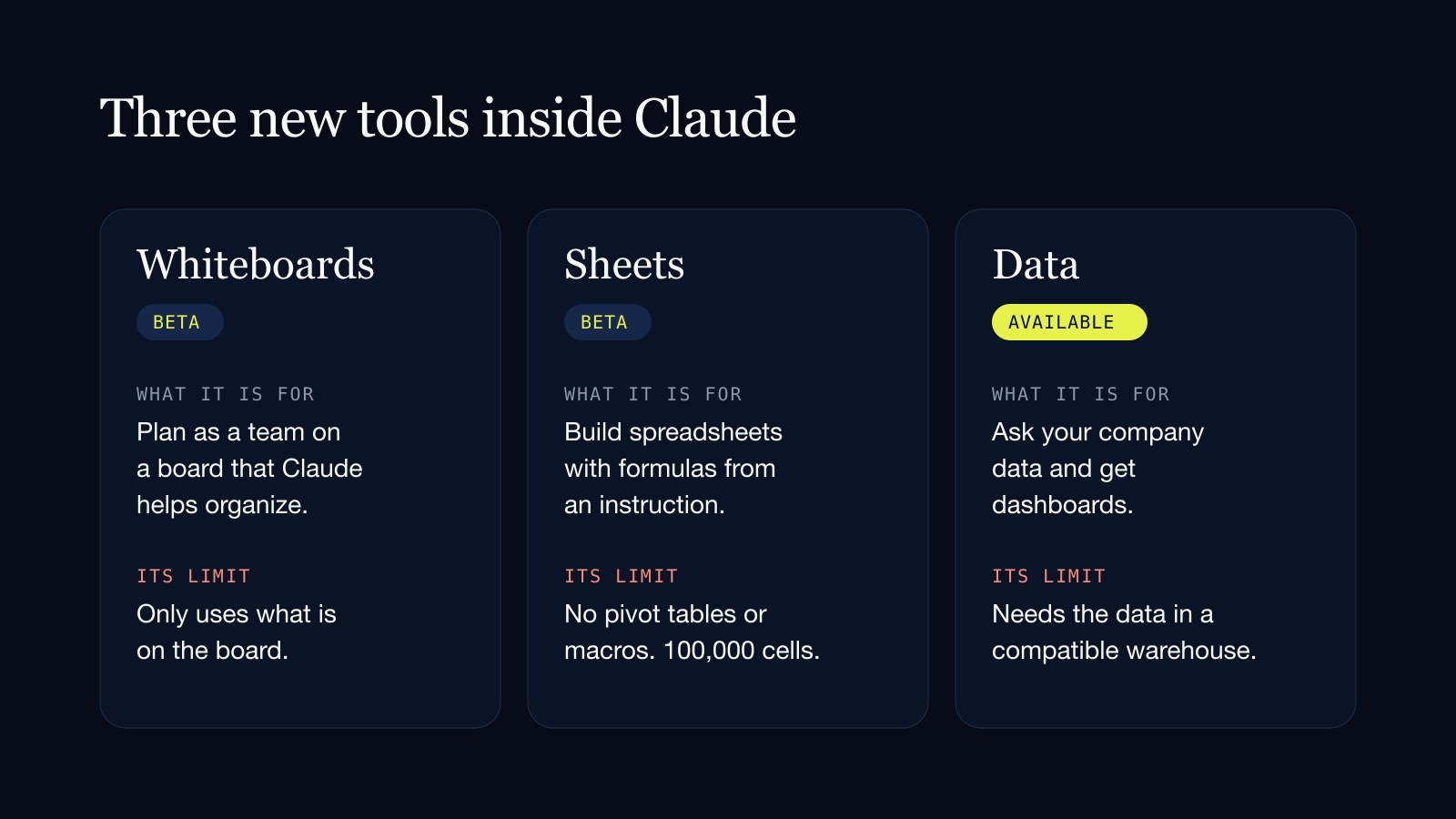
On November 10, 2026, Anthropic launched three tools inside Claude: Whiteboards, a shared board; Sheets, a spreadsheet; and Data, which turns questions about your company's data into dashboards. With them Claude stops being just a chat and becomes a place where a team works together. It does not replace Excel yet, and Anthropic itself says so.
In short
Claude Whiteboards and Claude Sheets launched in beta; Claude Data is now generally available. They are included in every paid plan at no separate cost. They are for planning as a team, building spreadsheets from an instruction and querying company data without knowing how to code. Sheets has clear limits: no pivot tables or macros, and a cap of 100,000 cells. It is worth trying them on a small process before moving the team.
Until now, what Claude did ended in a text answer that someone copied into another program. These three tools change that: the result is a board, a sheet or a dashboard where several people, and Claude, work at the same time.
Claude Whiteboards: a board where the team thinks with Claude
Whiteboards is a shared board. The team adds ideas and Claude helps organize them.
Anthropic's examples come from everyday work: in a project retrospective, Claude groups the notes by theme and drafts the action items. In a launch plan, it builds the timeline with owners and dates. You can also ask it to find the gaps between two steps in a process.
Everyone works live on the same board and anyone can rearrange it. When you are done, it can be exported as an image, sent to tools such as Miro or Lucid, or turned into a document or a slide deck.
Its main limit: Claude only works with what is on the board. It does not use the information in your connected apps.
Claude Sheets: a spreadsheet Claude builds with you
Sheets is a spreadsheet Claude builds from an instruction. You ask for, say, a campaign tracker or a hiring budget, and it delivers the sheet with formulas, tabs, dropdowns and formatting.
Several people and Claude can edit the same cells at once, and each of Claude's changes is outlined so you can see it. You can import Excel, Google Sheets or CSV files, and export to Excel.
This is where more care is needed, because Anthropic publishes its limits plainly:
- Size: up to 100,000 cells.
- What it lacks: pivot tables, protected ranges, find and replace, saved filter views and PDF export.
- No macros: there are no macros or Excel's advanced functions.
- No live data: it cannot pull information from your connected apps.
- On mobile: the help center says access is basic and read-only.
For anyone who needs full Excel, Anthropic recommends exporting the sheet or using Claude inside Excel.
Claude Data: asking your company's data
Data is the most ambitious of the three and the only one already out of beta. It connects to where the company's information lives and answers questions by building dashboards.
It connects to data warehouses such as BigQuery, Snowflake, Databricks, Amazon Redshift and ClickHouse, and to Salesforce. From a question it generates dashboards, data stories with text and charts, and short narrated videos.
Two details matter for trusting what it shows:
- Every chart shows its query. Claude writes the query that pulls the data and leaves it visible, so someone on the team can check where each number came from.
- Anyone viewing a shared dashboard only sees the approved queries. They do not get open access to the database.
Its requirement is also its limit: it needs the company's data to already be in a compatible warehouse or system. A Claude Sheets spreadsheet cannot be a source for Claude Data.
What it costs and who gets it
All three tools are included in Claude's paid plans: Pro, Max, Ultra, Team and Enterprise. There is no separate price; their use counts within each plan's limits.
On the Team plan they come switched on. On Enterprise, Whiteboards and Sheets come switched off and an administrator decides whether to enable them.
One point for companies with sensitive information: during the beta, Sheets and Whiteboards do not support the strictest data-protection configurations, such as those used by hospitals or regulated institutions.
Why it moved Microsoft
The announcement was read as Anthropic stepping into office tools. That day, Microsoft's stock fell about 2%, according to reports from CNBC and Yahoo Finance cited by other outlets.
The reaction says more about the direction than about the present. Today Sheets does not replace Excel: it lacks pivot tables, macros and size. But the underlying idea is strong: instead of opening a program and learning to use it, you tell the AI what you need and it builds the tool.
What it means for your business
- Do not migrate yet. Two of the three are in beta with published limits. If your operation lives in Excel with macros or pivot tables, stay there.
- Try them where there is improvisation today. A brainstorm that ends in photos of a whiteboard, a tracker someone builds from scratch every month. There the benefit is immediate and the risk is low.
- The big value is in the data, and it demands order. Claude Data only helps if the company's information is gathered and clean. That groundwork is what most companies have not done.
- Always ask to see where the number comes from. Having every chart show its query is the right practice. Demand the same from any AI tool that hands you figures.
At Vilo AI Studio we help companies take that earlier step: gathering and organizing their information so an AI can work with it.
See Vilo AI Studio's process automation service.
Sources
- Anthropic: more ways to work with Claude (Sheets, Whiteboards and connectors)
- Claude Help Center: Sheets
- Claude Help Center: Whiteboards
- Claude Help Center: Data
- Glitchwire
- Vanja
Which spreadsheet does your team build from scratch every month, and how long does it take?
Get in touch Artificial intelligence
 Artificial intelligence