 Artificial intelligence
Anthropic announced Claude Meetings on November 10, 2026, and two days later began rolling it out in beta. Claude joins the video call as one more participant, follows the conversation and works right there: it takes notes, answers questions and builds documents. For now it only works on Google Meet and on team plans, but it changes what you can expect from a meeting.
In short
Claude Meetings puts Claude inside your Google Meet calls as a visible participant. During the meeting it takes notes, answers in writing and builds documents or whiteboards; afterwards it leaves the summary, action items and transcript. It is in beta for Team and Enterprise plans, and notes are free during the beta. It stores the transcript, not the audio. Before using it, tell every participant and decide which meetings it may join.
There are already many tools that record a meeting and deliver minutes. Claude Meetings aims at something else: getting the work that normally starts after you hang up, such as writing the plan or assigning the action items, done during the call.
What Claude Meetings is
Claude Meetings is a Claude feature that brings it into your video calls. It appears in the participant list with its own tile and posts a notice in the call chat that it is present.
It is not a passive recorder. While the team talks, Claude can:
- Take notes and keep track of what is decided.
- Answer questions. You speak to it by saying "Claude", or type in the chat. It answers in writing.
- Build things on the spot. Just say "Claude, make a doc" or "make a whiteboard" and it drafts the plan or lays out the timeline being discussed.
- Use connected apps, such as sending a Slack message, with each person's permission.
How to add it to a meeting
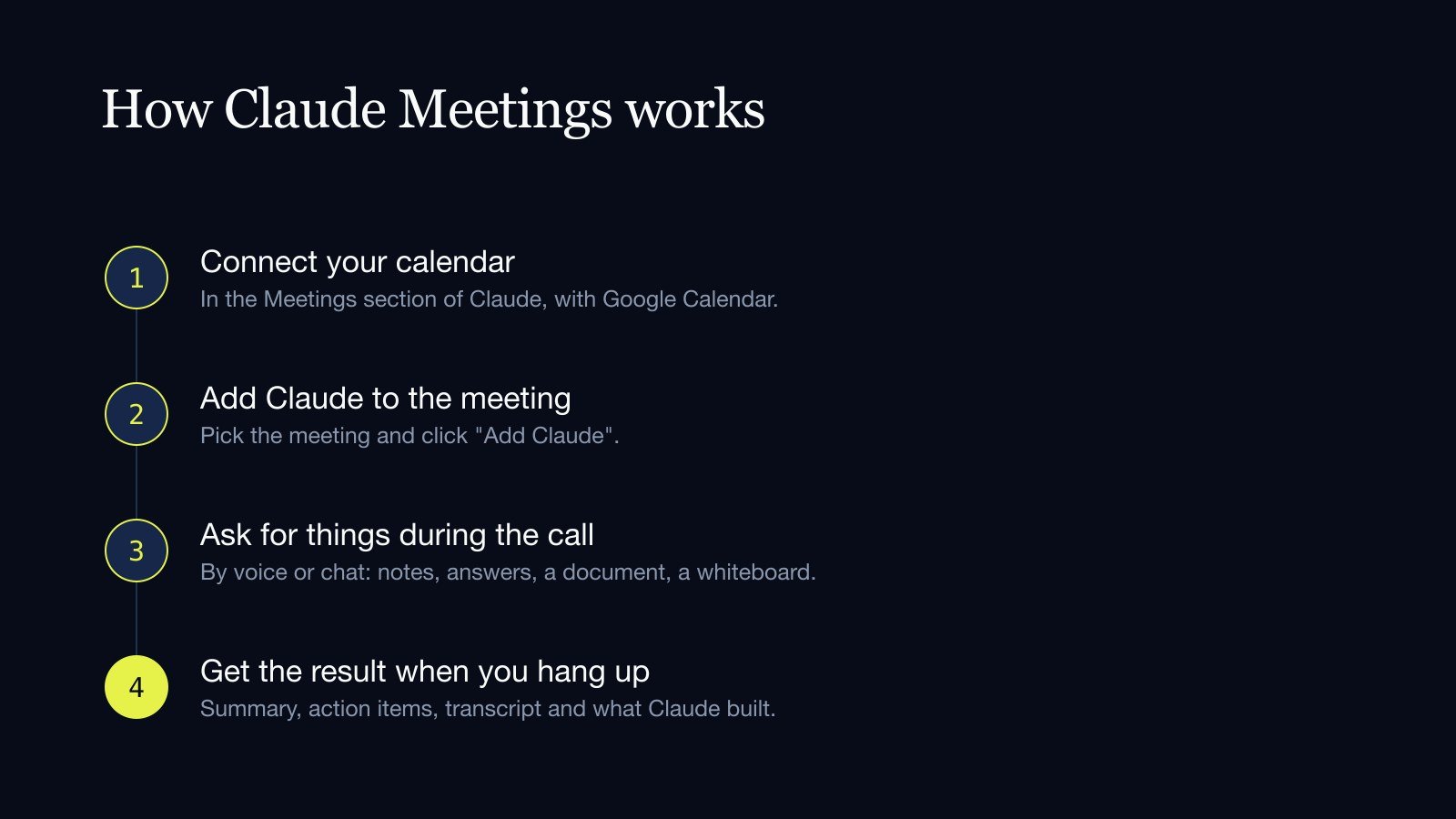
The process is short:
- You go to the Meetings section in Claude and connect your Google Calendar. First, the account owner has to enable it for the organization.
- You pick a meeting on your calendar and click "Add Claude".
- If Claude asks to enter the call, the host lets it in. If declined, it does not try again.
It can also be set to join every meeting automatically, or every meeting except one-on-ones. During the call it can be paused or removed, and it can stay for up to eight hours.
What it leaves you afterwards
Each meeting gets its own page in Claude. It holds the notes, with a summary and action items, the transcript and everything Claude built during the call.
Members of the organization who were invited receive a recap email with the link. Later you can ask Claude about past meetings from a regular chat.
What it stores and what it does not
Claude stores the transcript, a summary and a description of what was shown on screen. It does not store the audio.
There are two things Anthropic has not published and that a company should ask before adopting it: how long transcripts are kept and whether they are used to train the models.
For now it is not available to organizations with the strictest data-protection configurations, such as those in healthcare.
Outside guests
This is the most sensitive point. A transcript of an internal meeting is one thing; one of a call with a client or a supplier is another.
Anthropic's article says that, by default, Claude stays out if an outside guest is invited and leaves if one joins. Its help center says something different for the Team plan: there, meetings with external guests are allowed by default. The safe move is to check that setting in your account before the first meeting.
When it is allowed, what guests say goes into the notes and transcript, but they do not receive the meeting page or the recap email.
Anthropic asks organizations to make sure everyone on the call is OK with being transcribed. Claude announces that it is present, but does not ask people one by one. That responsibility belongs to whoever invites it.
What it costs and who gets it
- Plans: Team and Enterprise only. On Team it is on for everyone; on Enterprise it is off.
- Platform: Google Meet only. Anthropic says others are coming, with no dates.
- During the beta: notes, transcripts and in-call answers are free. The documents and whiteboards it builds are free until February 10, 2027.
- What does count: when Claude uses connected apps, that use counts toward each person's own usage and can lead to charges.
Anthropic has not said what it will cost after the beta.
If your team already uses another note-taking tool
Anthropic announced it is working with Gong, Attention, Granola, Fireflies.ai, Otter and Plaud so that a meeting's transcript can soon be sent to those tools. It is not available yet.
The analysts' reading is that the transcript is no longer the product. Anyone can take notes; what is now being contested is who delivers the finished work.
What it means for your business
- Start with internal meetings. Follow-ups, weekly planning, project wrap-ups. The risk is low there and the benefit shows from the first one.
- Always tell people. Before bringing Claude into a call, say so and get everyone's agreement. With clients and suppliers, also check with your lawyer what data-protection law requires.
- Decide which meetings it does not join. Personnel matters, negotiations, legal issues. It is easier to decide beforehand than to explain afterwards why there was a transcript.
- Measure by what gets done. The test is not whether the minutes are good, but whether the plan, the owners and the dates exist when you hang up.
If your team does not use Google Meet or does not have a Team plan, the idea still applies: at Vilo AI Studio we build assistants that take a recorded meeting and deliver the action items in the tool your team already uses.
See Vilo AI Studio's process automation service.
Sources
- Anthropic: Claude Meetings
- Claude Help Center: using Claude Meetings
- TechCrunch, November 10, 2026
- Dataconomy, November 13, 2026
- UC Today
How many hours a week does your team spend writing down what was already said in a meeting?
Get in touch Artificial intelligence
 Artificial intelligence